
Function
Our platform features a Batch Update function, allowing users to modify or insert multiple records simultaneously. Refer to Figure 1 below to see the Batch Update interface, accessible via the Batch Update button  .
.
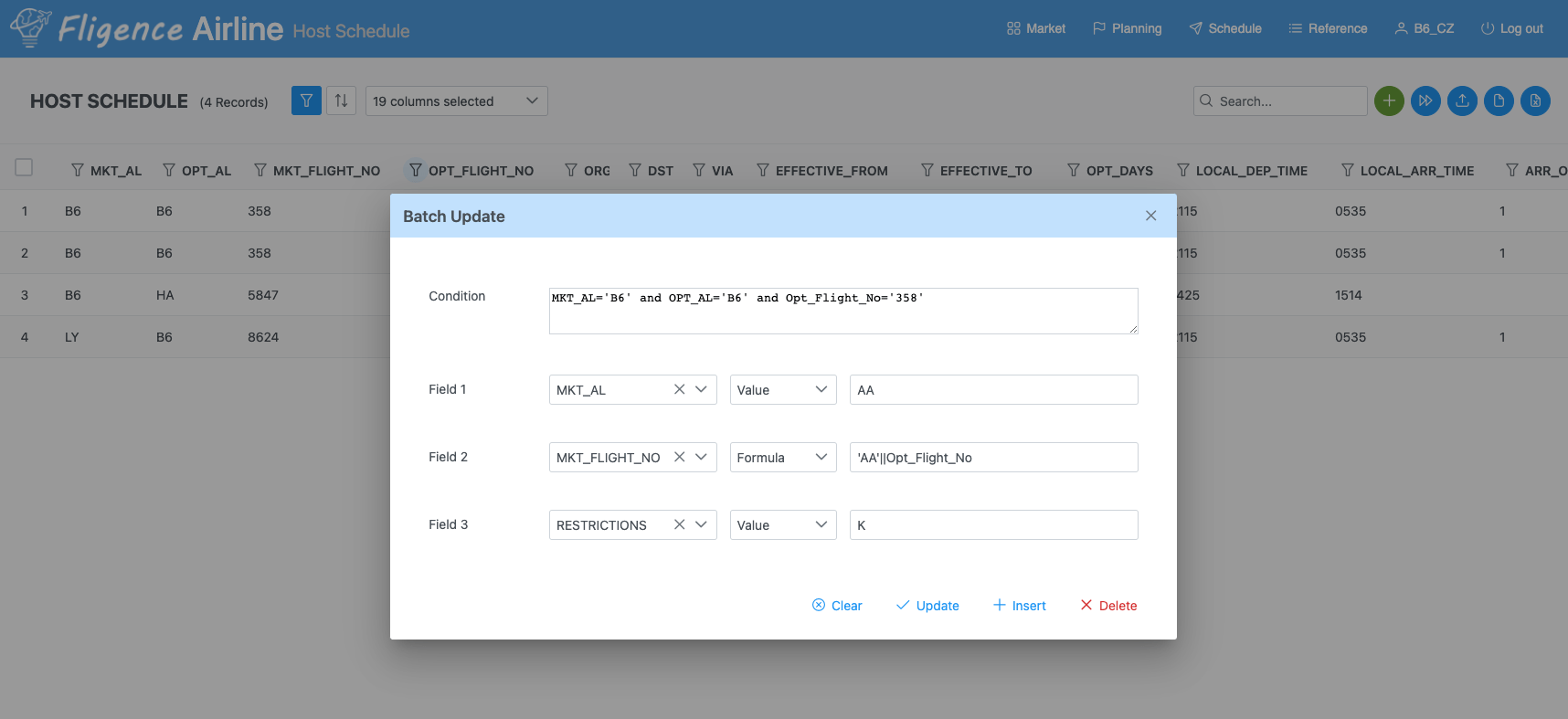
Below are the steps for using the Batch Update function:
- Inputting a Condition: Start by entering a condition, unless you’re updating the entire table. Multiple conditions can be connected with And or Or. Every field from the table is available for use. For text values, enclose them in single quotations (”).
- Selecting Fields and Assign Values: Choose the fields you wish to modify using the Field1, Field2, and Field3 dropdown lists. Assign values (either numbers or strings) or apply formulas. In the provided image, Field 1 has been assigned a value, while Field2 utilizes a formula. This formula appends the prefix AA to the Opt_Flight_No, saving the result to the Mkt_Flight_No field. Note that field names, whether used in conditions or in the Field1/2/3 selections, aren’t case-sensitive.
- Taking an Action:
- Clear: Erases all inputs in the Condition and Field sections.
- Update: Modifies the database records based on your input.
- Insert: Duplicates records matching the given condition, alters the selected fields, and adds them to the current table.
- Delete: Removes all records that meet the specified condition.
Use Case
The Batch Update feature can be particularly useful for generating codeshare records. For instance, by clicking the Insert button (as shown in the image), the system would create codeshare records for flight 358 operated by B6, but marketed under the airline code AA. Simultaneously, these new records will adopt marketing flight numbers comprised of the prefix AA combined with the original operating flight numbers.
The Restriction field in the schedule table helps identify flights based on their ability to carry varying traffic types, such as local, domestic connection, or international connection. Detailed explanations of these restriction tags can be found here. As illustrated in the above example, the system designates a K to all new codeshare records. This signifies that these flights are exclusive for connections and are not permitted to handle local traffic.